
技术实践
关于对象合并
我设计了一个curd的模式操作,因为我的后端有很多一样的增删改查,如果每个页面都去这样写,会不会觉的很麻烦,因为在vue,中最终绑定定的数据

羊先生2022.03.19 · 3 分钟阅读 · 56 阅读

我设计了一个curd的模式操作,因为我的后端有很多一样的增删改查,如果每个页面都去这样写,会不会觉的很麻烦,因为在vue,中最终绑定定的数据,返回的一个对象
js
// 设计基础增删改查
const curd = {
    tableData: [], // 表格数据
    loading: false, // loading
    selectedRowKeys: [], // 批量选择
    create: {
        dom: '',
        visible: false,
        formState: '',
        api: '',
        handle() {
            post(toRaw(curd.create.formState), { notify: true }).then(() => {
                curd.create.visible = false
                curd.get.handle()
            })
        },
        change() {
            curd.create.visible = true
        },
    },
    get: {
        ks: '',
        api: '',
        handle() {
            post(curd.get.api, { ks: curd.get.ks }).then((res: any) => {
                curd.tableData = res
                curd.loading = false
            })
        },
    },
    edit: {
        visible: false,
        id: '',
        api: '',
        formState: '',
        handle() {
            post(curd.edit.api, toRaw(curd.edit.formState), { notify: true }).then(() => {
                curd.edit.visible = false
                curd.get.handle()
            })
        },
        change({ record }: { record: any }) {
            curd.edit.visible = true
            curd.edit.id = record.id
        },
    },
    delete: {
        id: '',
        api: '',
        record: {
            id: '',
        },
        handle() {
            post(curd.delete.api, { id: curd.delete.record.id }, { notify: true }).then(() => {
                curd.get.handle()
            })
        },
    },
    deletes: {
        api: '',
        handle() {
            const ids = curd.selectedRowKeys.map((item: any) => item.id)
            if (!ids.length) {
                return message.warning('请至少选择一个')
            }
            post(curd.delete.api, { ids }, { notify: true }).then(() => {
                curd.get.handle()
            })
        },
    },
    selection: {
        onChange: (selectedRowKeys: (string | number)[], selectedRows: any) => {
            curd.selectedRowKeys = selectedRows
        },
    },
    refreshLoad() {
        curd.loading = true
        curd.get.handle()
    },
    handleSearch() {
        curd.get.handle()
    },
}

const TableCurd = function(data?: object) {
    return Object.assign(curd, data)
}
export default TableCurd
对象合并 Object.assign
const TableCurd = function(data?: object) {
    return Object.assign(curd, data)  // lodash.assign 也一样
}
使用
js
const table = TableCurd({ create: { api: '/role/create' } })
console.log(table)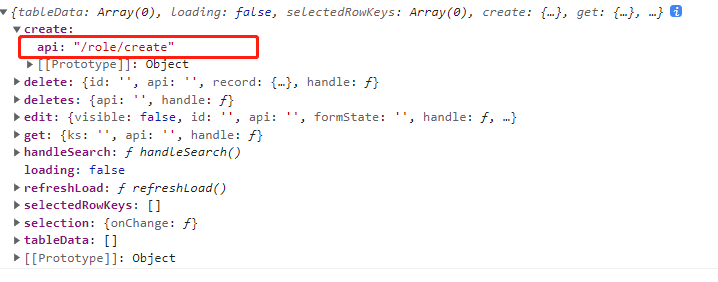
打印结果发现把create给替换掉了,没有遍历它的子节点
对象合并loadsh.merge
js
import { merge } from 'lodash'
const TableCurd = function(data?: object) {
    return merge(curd, data)
}
使用
js
const table = TableCurd({ create: { api: '/role/create' } })
console.log(table)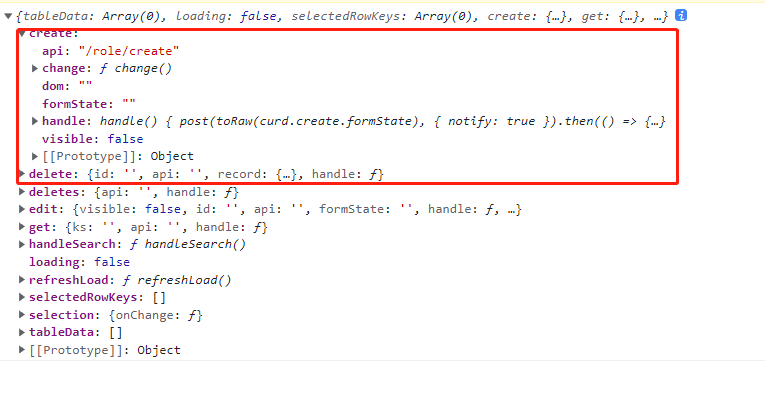
打印结果,替换掉了api,并且已经有了我刚才写的属性
自己写一个合并策略
js
function assiginObj(target = {}, sources = {}) {
    let obj: any = target
    if (typeof target != 'object' || typeof sources != 'object') {
        return sources // 如果其中一个不是对象 就返回sources
    }
    for (let key in sources) {
        // 如果target也存在 那就再次合并
        if (target.hasOwnProperty(key)) {
            obj[key] = assiginObj(target[key], sources[key])
        } else {
            // 不存在就直接添加
            obj[key] = sources[key]
        }
    }
    return obj
}
使用
const TableCurd = function(data?: object) {
    return assiginObj(curd, data)
}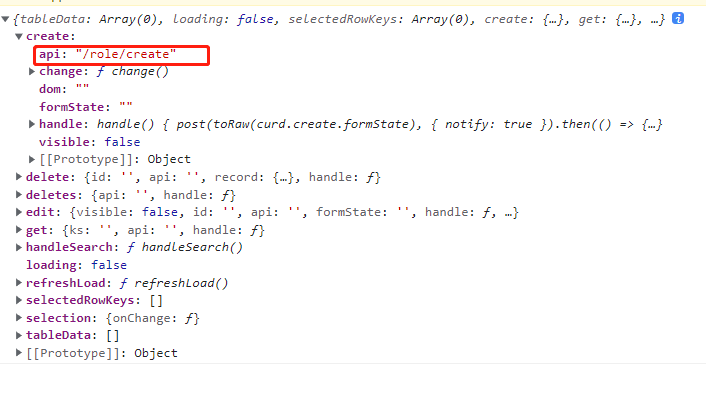
发现也是阔以的
jquery的$.extend
js
$.extend({a:{b:{c:1,d:2}}},{a:{b:{d:222,e:1111}}})1、用一个或多个其他对象来扩展一个对象,返回被扩展的对象。
2、如果不指定target,则给jQuery命名空间本身进行扩展。这有助于插件作者为jQuery增加新方法。 如果第一个参数设置为true,则jQuery返回一个深层次的副本,递归地复制找到的任何对象(递归合并)。否则的话,副本会与原对象共享结构。 未定义的属性将不会被复制,然而从对象的原型继承的属性将会被复制。
总结:
lodash.assign和Object.assign:后面的会覆盖前面的对象属性,不会递归遍历。
lodash.merge和$.extend: 后面的会覆盖前面的对象属性,会递归遍历。