
技术实践
在vscode中使用别名@按住ctrl也能跳转对应路径
我们在利用VS code开发的时候,我们使用vue.config.js可以设置一个变量 比如 @ 来表示一个相对路径的文件目录,但是按住ct

羊先生2020.04.29 · 1 分钟阅读 · 1.5k 阅读

在开发vue项目时候,我们常常在vue.config.js这样配置:
js
const path = require('path');

function resolve (dir) {
    return path.join(__dirname, dir)
}

module.exports = {
    lintOnSave: false,

    chainWebpack: config => {
        config.resolve.alias
            .set('@',resolve('src')) // 设置别名
    },

    pluginOptions: {
        // 配置全局less
        'style-resources-loader': {
            preProcessor: 'less',
            patterns: [resolve('./src/style/theme.less')]
        }
    }

}
在其他地方使用
js
import Vue from 'vue';
import VueRouter from 'vue-router'
Vue.use(VueRouter)

import defaultRouter from './defaultRouter'
import addPostRouter from './dynamicRouter';

import store from '@/store'; // 这里用到别名

const router = new VueRouter({
    routes: defaultRouter,
    mode: 'hash',
    scrollBehavior(to, from, savedPosition) {
        // keep-alive 返回缓存页面后记录浏览位置
        if (savedPosition && to.meta.keepAlive) {
            return savedPosition;
        }
        // 异步滚动操作
        return new Promise((resolve, reject) => {
            setTimeout(() => {
                resolve({ x: 0, y: 0 })
            }, 200)
        })
    }
})

// 消除路由重复警告
const selfaddRoutes = function (params) {
    router.matcher = new VueRouter().matcher;
    router.addRoutes(params);
}

router.beforeEach((to, from, next) => {
    const { hasRoute } = store.state;
    if (hasRoute) {
        next()
    } else {
        addPostRouter(to, from, next, selfaddRoutes)
    }
})
export default router;我们想按住ctrl点击跳转到该页面去
安装插件
在vscode中插件安装栏搜索 Path Intellisense
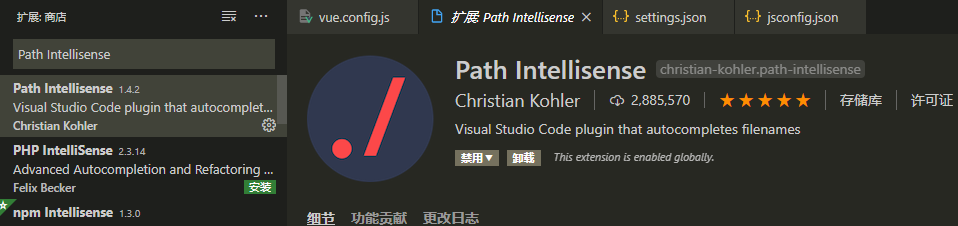
点击设置
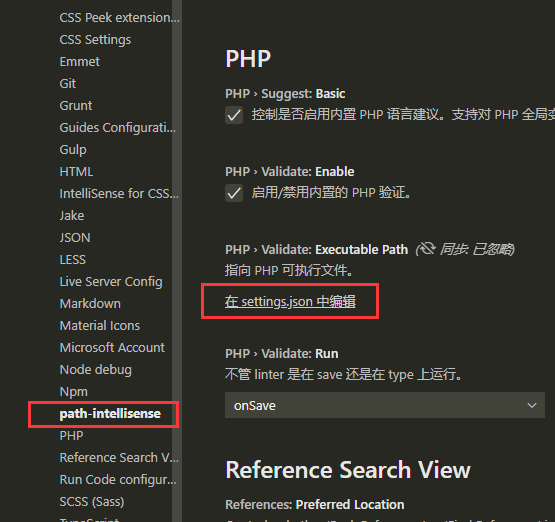
t打开settings.json文件添加 以下代码 "@": "${workspaceRoot}/src"
json
{
    "workbench.iconTheme": "material-icon-theme",
    "editor.fontSize": 16,
    "editor.detectIndentation": false,
    "guides.enabled": false,
    "workbench.colorTheme": "Monokai",
    "path-intellisense.mappings": {
        "@": "${workspaceRoot}/src"
    }
}
在项目package.json所在同级目录下创建文件jsconfig.json
json
{
    "compilerOptions": {
        "target": "ES6",
        "module": "commonjs",
        "allowSyntheticDefaultImports": true,
        "baseUrl": "./",
        "paths": {
          "@/*": ["src/*"]
        }
    },
    "exclude": [
        "node_modules"
    ]
}