
技术实践
全网最全解决node-sass安装失败总结
在执行`npm install node-sass`的时候,控制台会看到正在从github下载一个`win32-x64-72_binding

羊先生2021.09.22 · 4 分钟阅读 · 56 阅读

问题描述?
执行
bash
npm i node-sass -D关键词描述:
bash
tunneling socket could not be established, cause=getaddrinfo ENOTFOUND 49402 // 这个端口号每个人出现的可能不一样
bash
Error: Could not find any Python installation to use ...图描述
如果遇到这些问题,那么在这里应该就能找到答案
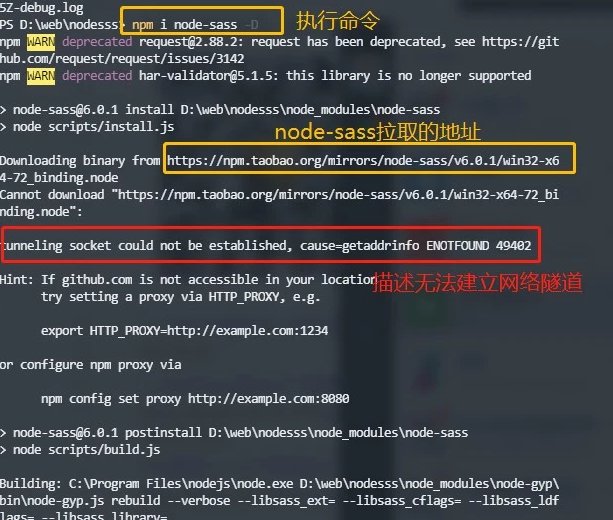
最终报的错误信息
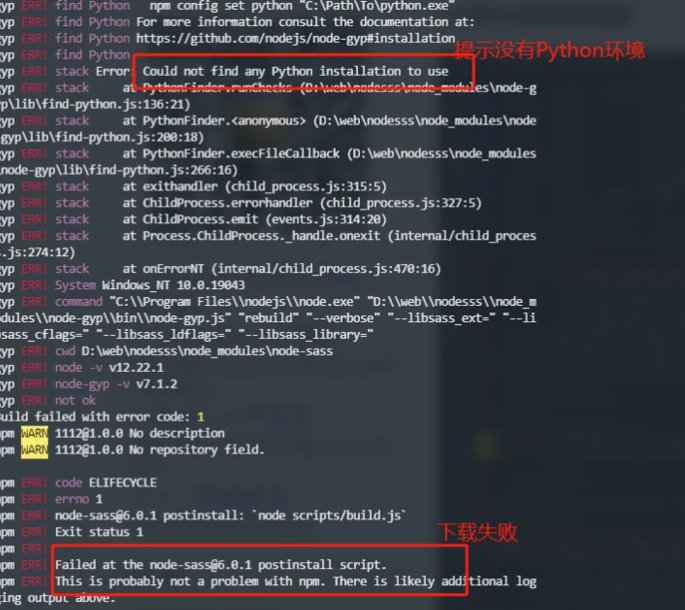
为什么有Python的提示报错
原因:提示没有安装python、build失败,如果拉取binding.node失败,node-sass会尝试在本地编译binding.node,过程就需要用到python
为什么会下载失败
在执行
npm install node-sass的时候,控制台会看到正在从github下载一个win32-x64-72_binding.node的文件,这是一个二进制文件,并不存在npm仓库,而是直接从github下载,下载非常慢,如果本地没有墙过,失败的几率会比较大
解决下载慢5种方法
- 所有的依赖都设置淘宝镜像
bash
npm config set registry https://registry.npm.taobao.org/ - 只对node-sass设置拉取地址
bash
npm install node-sass --sass-binary-site=https://npm.taobao.org/mirrors/node-sass - 在npm config设置
bash
npm config set sass_binary_site https://npm.taobao.org/mirrors/node-sass - 在package.json
bash
"nodeSassConfig": { "binarySite": "https://npm.taobao.org/mirrors/node-sass" }, - 在项目目录下新建**
.npmrc**文件bashregistry=https://registry.npm.taobao.org/ # 设置私有服 @pm:registry=http://192.168.1.200:8081/repository/npm/bash# 比如安装 npm install @pm/axios -S npm install @pm/vue -S
以上没有解决,解决端口号问题
我的电脑所报的是:49402
查看npm配置
bash
npm config list -l // 查看npm所有配置检查里面是否代理字段,如有删除
bash
npm config delete proxy
npm config delete https-proxy
检查环境变量
在这里发现了一个49402端口,把它删掉
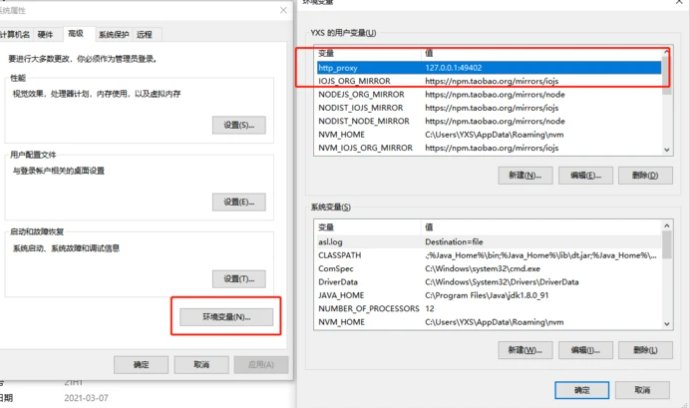
🐱 清除环境变量后注意,电脑重启一次
重启之后
到这里做的以上这些检查,或者配置,我已经解决node-sass安装问题
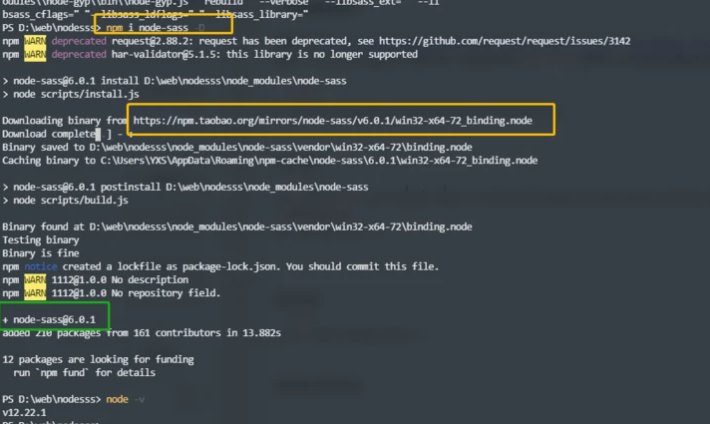
补充
下载文件至本地方法
目前验证失败
就是先从https://npm.taobao.org/mirrors/node-sass,
选取一个node-sass版本先下载下来,然后在本地npm chche目录中,比如我的电脑的目录
bash
C:\Users\YXS\AppData\Roaming\npm-cache\node-sass然后设置
bash
npm config set sass-binary-site C:/Users/YXS/AppData/Roaming/npm-cache/node-sass
# 查看是否生效
npm config list -l
然后安装
bash
npm i node-sass@4.10.0 -DWindows系操作系统
管理员权限执行以下命令
npm install --global --production windows-build-tools目前验证失败
临时CMD代理
以后如果需要临时给 cmd 设置代理可以使用以下 命令行,这种环境变量只会持续到cmd窗口关闭,不是系统环境变量
bash
set http_proxy=http://127.0.0.1:1080
set https_proxy=http://127.0.0.1:1080
更有用的知识
https://blog.csdn.net/weixin_38384296/article/details/116403848