

快速了解
完整资料
资料已展开关于 Pomodoro timer
状态提示: 最近一次检测未能正常访问官网,该工具可能已经停止服务。以下内容作为历史资料保留。
Pomodoro timer
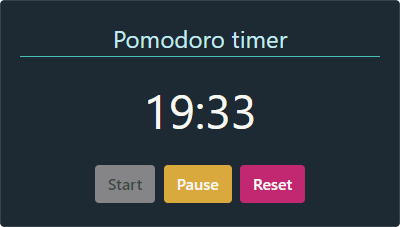
一个基于Vue开发的倒计时组件
| 属性 | 默认值 | 描述 | 类型 |
|---|---|---|---|
| content1 | 25 | 设置倒计时多少分钟 | Number |
| seconds | 0 | 设置倒数秒 | Number |
| pomodoro-label | Pomodoro Timer | 向计时器容器添加描述性标签 | String |
| start-label | Start | 在计时器的开始按钮上添加描述性标签 | String |
| pause-label | Pause | 在计时器的暂停按钮上添加描述性标签 | String |
| reset-label | Reset | 在计时器的重置按钮上添加描述性标签 | String |
| muted | false | 定义倒计时结束时计时器是否必须播放声音 | Boolean |
| theme | dark | 定义计时器的样式。它具有三种不同的样式。bare, light 并且dark是可用的选项 | String |
组件源码
html
复制代码
<template>
  <div class="vuemodoro" :class="vuemodoroTheme">
    <div id="vuemodoro-label">{{pomodoroLabel}}</div>
    <div id="vuemodoro-timer">
      <span id="vuemodoro-counter">{{currentTime}}</span>
    </div>

    <div id="vuemodoro-buttons">
      <button
        id="vuemodoro-start"
        class="btn"
        :disabled="isStartDisabled"
        @click="runCountdown"
      >{{startLabel}}</button>
      <button
        id="vuemodoro-pause"
        class="btn"
        :disabled="isPauseDisabled"
        @click="pauseCountdown"
      >{{pauseLabel}}</button>
      <button
        id="vuemodoro-reset"
        class="btn"
        :disabled="isResetDisabled"
        @click="resetCountdown"
      >{{resetLabel}}</button>
    </div>
  </div>
</template>

<script>
import { PomodoroTimer } from "./lib/timer.js";
import { AudioPlayer } from "./lib/audio.js";

export default {
  name: "Pomodoro",
  data() {
    return {
      min: this.minutes,
      secs: this.seconds,
      timerId: 0,
      audio: null,
      running: false,
      paused: false,
      stopped: true,
      mute: this.muted
    };
  },

   mounted: function() {
     if(!this.mute)
       this.audio = AudioPlayer.createAudio();
   },

  props: {
    minutes: {
      type: Number,
      validator: function(value) {
        return value >= 0 && value <= 60;
      },
      default: 25
    },
    seconds: {
      type: Number,
      validator: function(value) {
        return value >= 0 && value <= 59;
      },
      default: 0
    },
    pomodoroLabel: {
      type: String,
      default: "Pomodoro timer"
    },
    startLabel: {
      type: String,
      default: "Start"
    },
    pauseLabel: {
      type: String,
      default: "Pause"
    },
    resetLabel: {
      type: String,
      default: "Reset"
    },
    muted: {
      type: Boolean,
      default: false
    },
    theme: {
      type: String,
      validator: function(value) {
        return value === 'bare' || value === 'dark' || value === 'light';
      },
      default: "dark"
    }
  },

  computed: {
    currentTime: function() {
      let minutes = this.min < 10 ? "0" + this.min : this.min;
      let seconds = this.secs < 10 ? "0" + this.secs : this.secs;
      return `${minutes}:${seconds}`;
    },
    isStartDisabled: function() {
      return this.running;
    },
    isPauseDisabled: function() {
      return this.stopped || this.paused;
    },
    isResetDisabled: function() {
      return false;
    },
    vuemodoroTheme: function() {
      return {
        light: this.theme === "light",
        dark: this.theme === "dark"
      };
    }
  },

  methods: {
    run: function() {
      this.running = true;
      this.paused = false;
      this.stopped = false;
    },

    pause: function() {
      this.running = false;
      this.paused = true;
      this.stopped = false;
    },

    stop: function() {
      this.running = false;
      this.paused = false;
      this.stopped = true;
    },

    runCountdown: function() {
      if (this.stopped === true) {
        AudioPlayer.stopAlarm(this.audio);
        this.min = this.minutes;
        this.secs = this.seconds;
      }

      this.timerId = PomodoroTimer.startCountdown(
        this.min,
        this.secs,
        this.updateComponentTime
      );
      this.run();
    },

    updateComponentTime: function(seconds) {
      let time = PomodoroTimer.remainingTime(seconds);
      this.min = Number(time.mm);
      this.secs = Number(time.ss);
      if (time.running === false) {
        this.stop();
        AudioPlayer.playAlarm(this.mute, this.audio);
      }
    },

    pauseCountdown: function() {
      PomodoroTimer.pauseCountdown(this.timerId);
      this.pause();
    },

    resetCountdown: function() {
      PomodoroTimer.stopCountdown(this.timerId);
      this.min = this.minutes;
      this.secs = this.seconds;
      this.stop();
      AudioPlayer.stopAlarm(this.audio);
    }
  }
};
</script>

<style scoped>
.vuemodoro {
  display: block;
  width: 400px;
  margin: 0.5rem auto;
  border: 0.25rem solid #ccc;
  text-align: center;
  padding: 1rem;
  font-family: -apple-system, BlinkMacSystemFont, "Segoe UI", Roboto,
    Oxygen-Sans, Ubuntu, Cantarell, "Helvetica Neue", sans-serif;
}

.vuemodoro .btn {
  text-align: center;
  cursor: pointer;
  margin: 4px 2px;
  border: 1px solid transparent;
  padding: 0.375rem 0.75rem;
  font-size: 1rem;
  line-height: 1.5;
  border-radius: 0.25rem;
  vertical-align: middle;
  font-weight: 600;
}

.vuemodoro #vuemodoro-label,
.vuemodoro #vuemodoro-timer {
  margin-bottom: 1rem;
}

.vuemodoro #vuemodoro-label {
  font-size: 1.5rem;
}

.vuemodoro #vuemodoro-timer {
  font-size: 3rem;
  font-weight: 400;
}

/*Dark theme*/
.vuemodoro.dark {
  background: #1d2a33;
  border: 0.25rem solid #1d2a33;
  border-radius: 0.25rem;
  color: #f8f8f2;
}

.vuemodoro.dark .btn {
  color: #f8f8f2;
}

.vuemodoro.dark #vuemodoro-label {
  color: #c1ebf2;
  border-bottom: 1px solid #44c2b9;
}

.vuemodoro.dark #vuemodoro-start {
  background-color: #3fceef;
  border-color: #3fceef; /*#7adcc9;*/
}

.vuemodoro.dark #vuemodoro-pause {
  background-color: #d9a93d;
  border-color: #d9a93d; /*#c17ec8;*/
}

.vuemodoro.dark #vuemodoro-reset {
  background-color: #c22772;
  border-color: #c22772;
}
.vuemodoro.dark #vuemodoro-start:disabled,
.vuemodoro.dark #vuemodoro-pause:disabled,
.vuemodoro.dark #vuemodoro-reset:disabled {
  background: #858588;
  border-color: #858588;
  color: #3a4a43;
  cursor: not-allowed;
}
/*End of dark theme*/

/*Light theme*/
.vuemodoro.light {
  background: #fefef5;
  color: #676766;
  border: 0.25rem solid #fefef5;
  border-radius: 0.25rem;
}

.vuemodoro.light .btn {
  color: #fefef5;
}

.vuemodoro.light #vuemodoro-label {
  color: #57749b;
  border-bottom: 1px solid #57749b;
}

.vuemodoro.light #vuemodoro-start {
  background-color: #4a8f8f;
  border-color: #4a8f8f; /*#7adcc9;*/
}

.vuemodoro.light #vuemodoro-pause {
  background-color: #c99e00;
  border-color: #c99e00; /*#c17ec8;*/
}

.vuemodoro.light #vuemodoro-reset {
  background-color: #c4626c;
  border-color: #c4626c;
}
.vuemodoro.light #vuemodoro-start:disabled,
.vuemodoro.light #vuemodoro-pause:disabled,
.vuemodoro.light #vuemodoro-reset:disabled {
  background: #707070;
  border-color: #707070;
  cursor: not-allowed;
  color: #999999;
}
/*End of Light theme*/
</style>
适合的使用方向
Pomodoro timer
Vuemodoro是Vue的一个文件组件,它实现了一个倒计时,目的是在Vue应用程序中提供一个番茄倒计时
组件源码
它附带了一组属性,使组件可以根据需要定制
主要用途
Vuemodoro是Vue的一个文件组件,它实现了一个倒计时,目的是在Vue应用程序中提供一个番茄倒计时。它附带了一组属性,使组件可以根据需要定制。例如,您可以自定义倒计时的持续时间或与组件交互的按钮标签。此外,你还可以根据你的Vuemodoro外观和感觉选择不同的样
收录线索
已停用Vue时间插件JS时间插件Vue倒计时插件倒计时组件插件 / 扩展
资料说明
内容根据公开资料整理;版本、兼容性与服务状态请以官网最新说明为准。